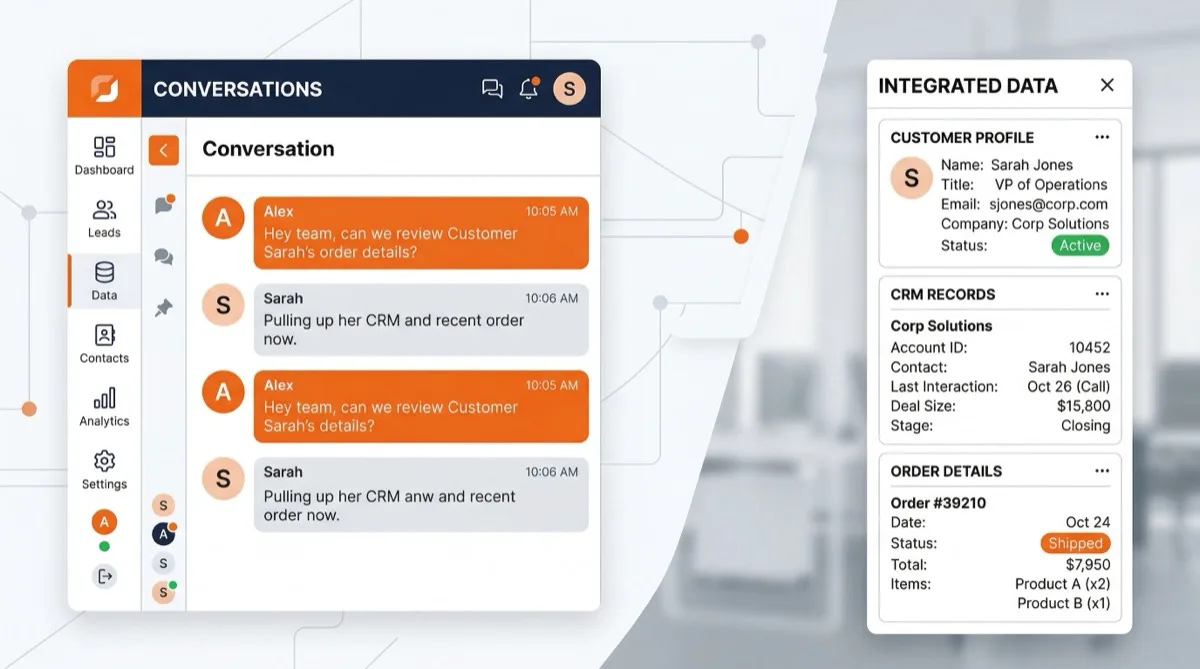
Context is everything in customer support. When a customer reaches out, your agent should not have to open five different tabs to understand who they are and what they need. Dashboard Apps bring external data directly into the FoxDesk AI conversation sidebar — so agents have the full picture without leaving the conversation.
How it works
Dashboard Apps embed external web pages within the FoxDesk AI conversation view. FoxDesk AI automatically passes contact and conversation data — including email, name, phone number, and conversation ID — to the embedded page, so it displays relevant information the moment an agent opens a conversation.
Common integrations
Display customer profiles from your CRM. Show order history and shipping status from your e-commerce platform. View subscription details and billing history from Stripe or your billing system. Surface product usage analytics from your internal dashboards. The possibilities are as broad as your tech stack.
Building your own Dashboard App
Any web page that reads URL parameters can become a Dashboard App. Build a simple page that accepts contact data as query parameters and returns the information your agents need. We provide full documentation and example templates to get you started quickly.
Setup
Navigate to Settings, then Integrations, then Dashboard Apps. Add a name and the URL of your web application. FoxDesk AI handles the parameter passing automatically. Available on all plans — no technical setup required beyond your external page.
The less time your agents spend hunting for information across tabs and tools, the more time they spend actually helping customers. Dashboard Apps make that shift effortless.
Found this helpful? Share it with your team.